Blog
Productivity

Making Long-Running Business Workflows Reliable

April 28, 2026
15
min read
IconIconIconIcon

A practical look at where long-running business processes break down — and how Taskurai makes the important moments durable, visible, and resumable.


The happy path

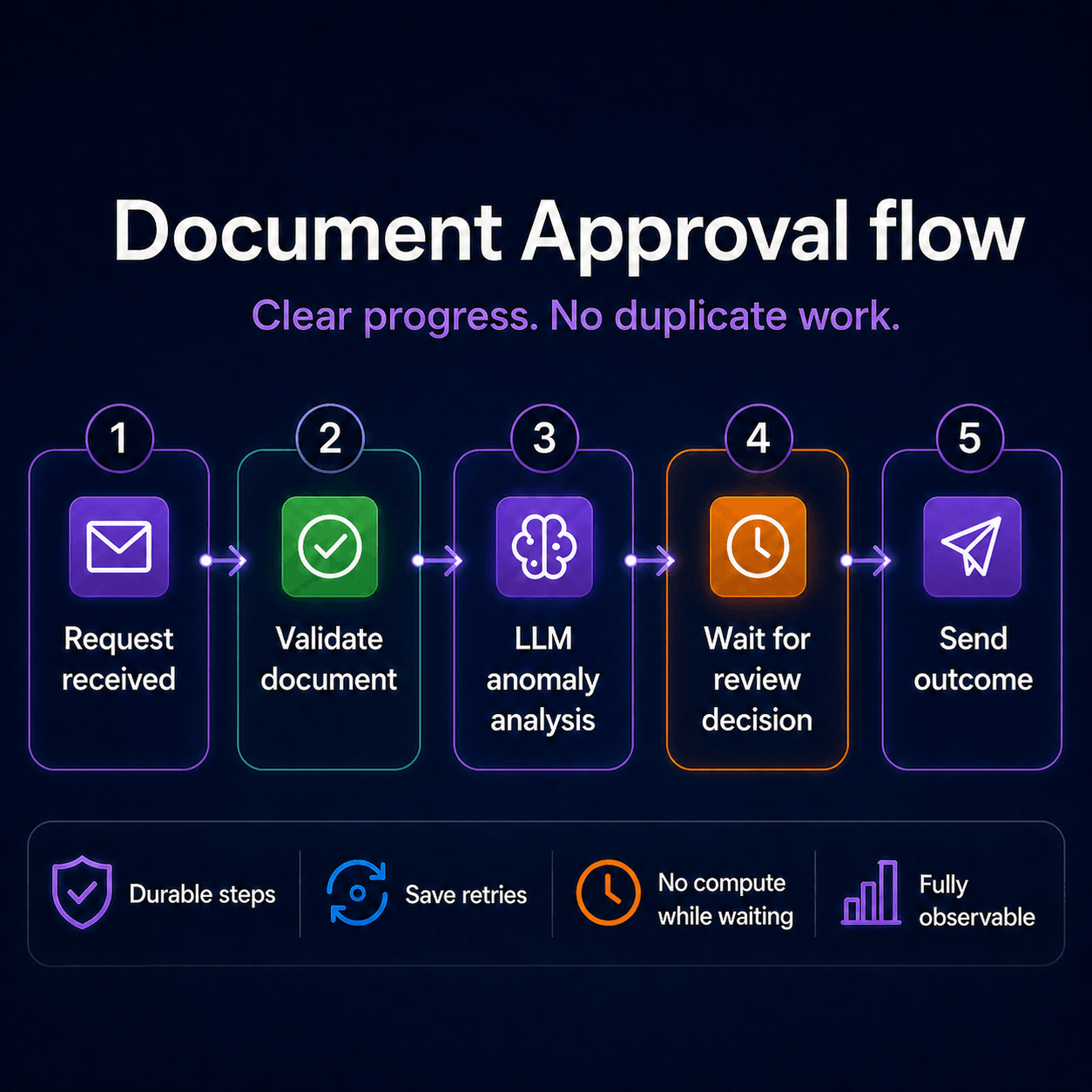
Some business processes sound simple when you describe them out loud:

  • A customer submits a document.
  • A confirmation email goes out.
  • The document is validated.
  • If something looks off, a person reviews it.
  • Once the decision is in, the sender gets the final outcome.

Five steps. Clear, readable, familiar.


Then reality shows up

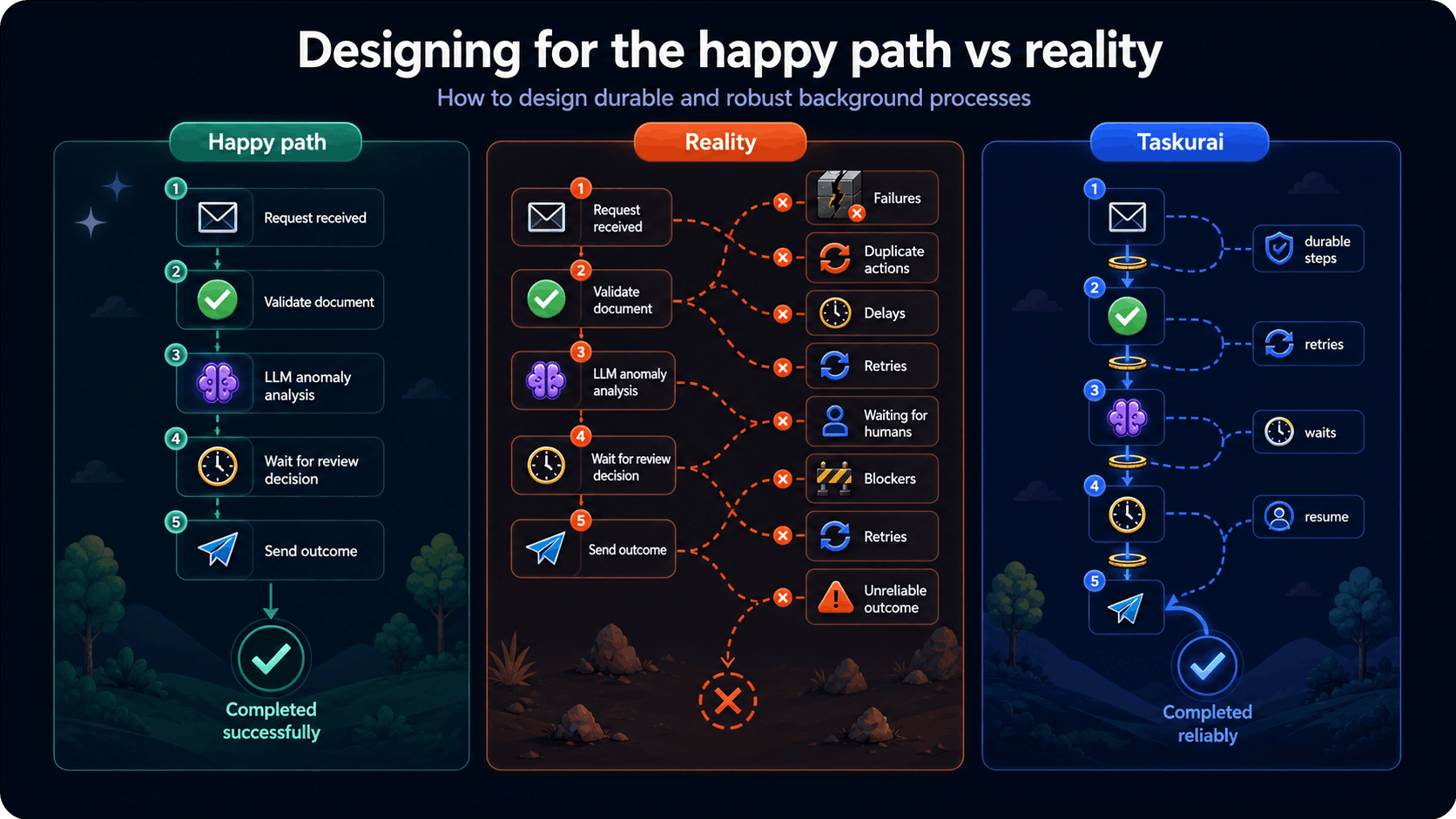
The complexity is not in the individual steps. It shows up later — when the system restarts mid-flow, when a transient error causes a retry, when three days have passed and the workflow needs to continue from exactly the right place.

Most teams have a story like this:

  • A background job ran twice because a worker restarted at the wrong moment.
  • A confirmation email was sent three times.
  • A paid API call happened again because nobody told the system it had already succeeded.
  • A process was silently stuck somewhere in the middle, and nobody knew until a customer called.

And when it happens, it is rarely obvious at first. Logs are scattered. The current state of the process is unclear. Recovery is difficult, because simply retrying the work can create new side effects: another email, another API call, another inconsistent update. Even fixing the system becomes delicate, because existing workflows may still be in progress and small changes can break the path they were already following.


What you actually want

You want a backend process that:

  • Does not act as a black box.
  • Recovers automatically from transient failures.
  • Can replay what failed, while keeping what already succeeded.
  • Makes problems easier to detect, debug, and understand.
  • Lets you fix issues in production while minimizing impact on workflows already in progress.

And you want all of that without moving the complexity somewhere else.

You do not want to spend your time designing message brokers, queues, workers, dead-letter handling, scaling rules, retry policies, and operational dashboards. That quickly turns a business problem into a platform problem, and pulls the team away from the process it actually wanted to build.


Making progress explicit

This is where Taskurai comes in.

The main idea is simple: the important moments in a long-running process should be explicit.

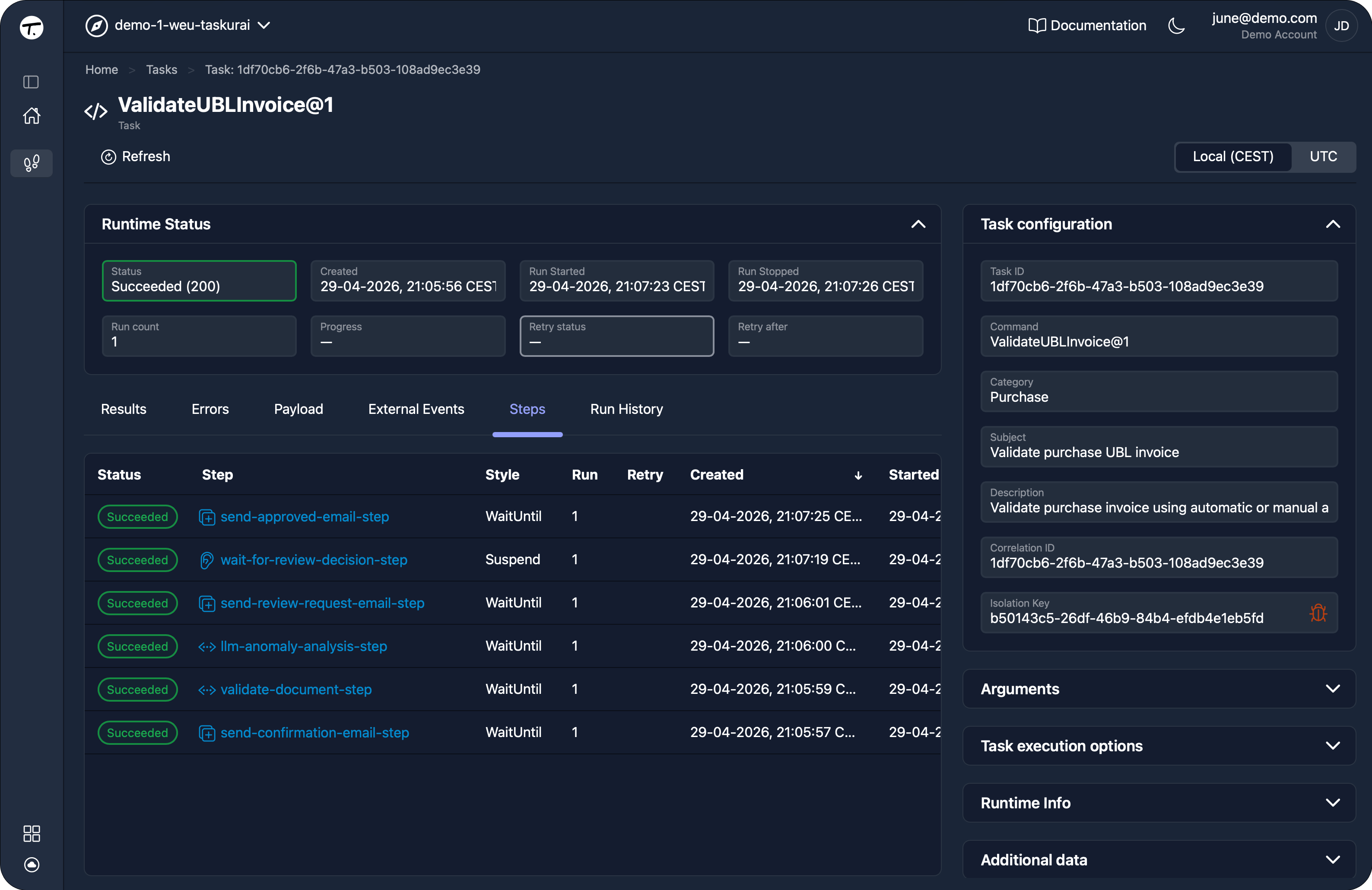
In Taskurai, you keep track of work by creating tasks. A task is a durable unit of work. It describes which command to execute and keeps track of its configuration, state, progress, and result over time.

Inside a command, you introduce durable steps to mark the moments that matter.

A step creates a clear boundary in the process. Its initialization runs once, its state is persisted, and when the command resumes later, a step that already completed does not run again.

That makes a real difference in practice:

  • A validation result remains stable after it succeeds.
  • A costly LLM call does not happen twice.
  • A confirmation email is created once, not duplicated on retry.
  • A workflow can wait days for approval and continue from the right point when the decision arrives.

How Taskurai can handle the sample business process

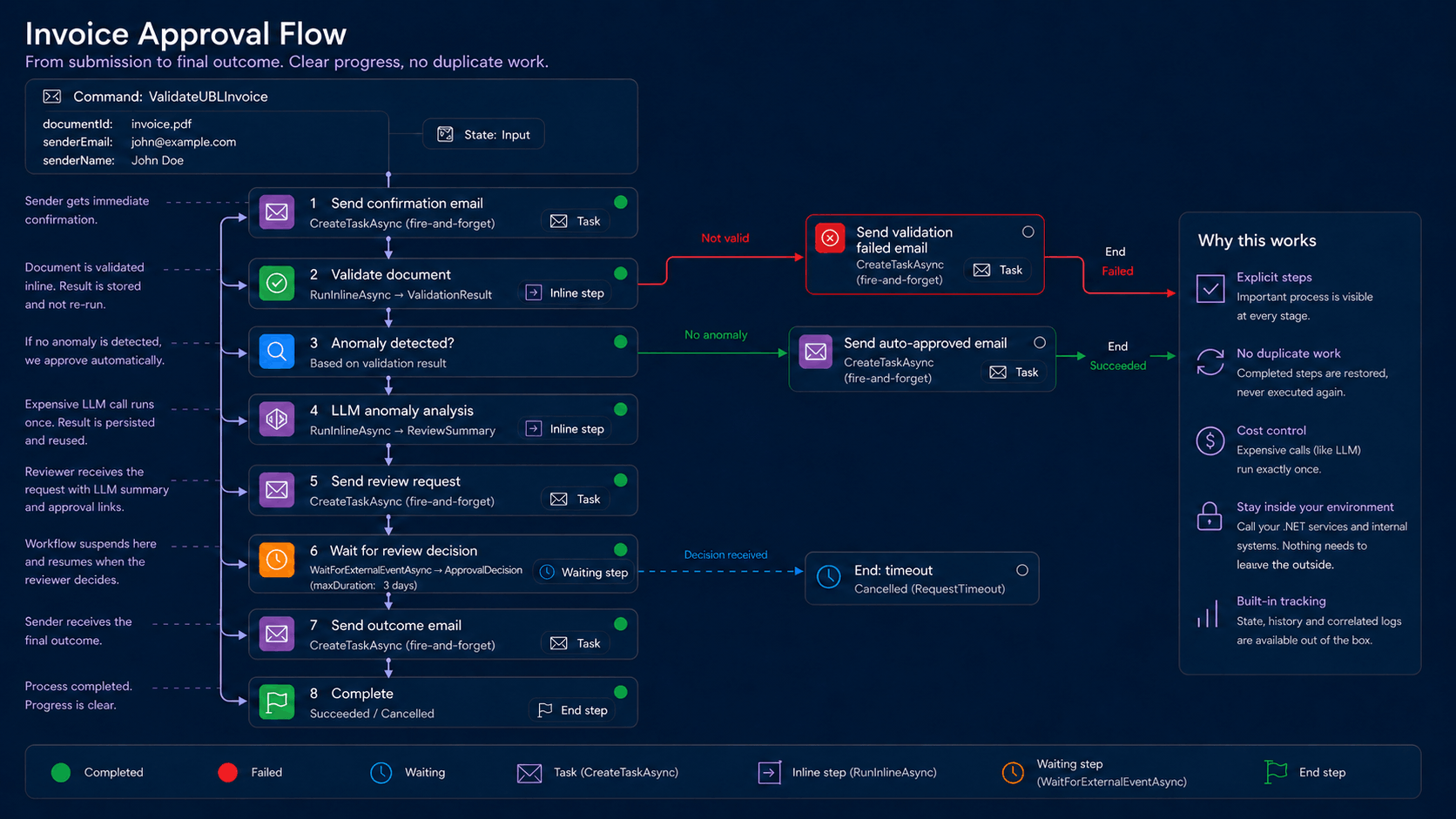
Here is the flow we are going to build:

  1. A document arrives with the sender's email and a reference to the document stored as state.
  2. A confirmation email is sent immediately as a separate durable task.
  3. The document is validated inline, with the result stored durably.
  4. If an anomaly is detected, an LLM analyzes it. This is expensive work, so once the step completes, the result should be reused.
  5. A review request is sent to the reviewer, including the LLM's summary.
  6. The workflow suspends until the reviewer decides. No compute being held.
  7. The sender receives the final outcome.
Full working code is on GitHubInvoice Approval Flow Sample

Below, the snippets that explain the thinking.


Step 1 — Send confirmation as a durable side task

C#
await context.CreateTaskAsync(
    id: "send-confirmation-email-step",
    init: (_) => new TaskConfig("SendEmail")
    {
        Arguments =
        {
            new TaskArgument("to")      { Value = senderEmail },
            new TaskArgument("subject") { Value = "We received your invoice document" },
            new TaskArgument("body")    { Value = $"Hi {senderName}, we've received your document and will process it shortly." }
        }
    }
);

CreateTaskAsync is durable. The step initializes once, regardless of what happens to the worker afterward. The email sub-command handles its own retries and observability — completely independent from the main flow.


Step 2 — Validate inline: Run once, persist the result

C#
var validation = await context.RunInlineAsync<ValidationResult>(
    id: "validate-document-step",
    run: async (stepContext, ct) =>
    {
        var document = await context.State.GetBlobStateContentAsync(documentReference);
        return await _documentService.ValidateAsync(document, ct);
    }
);

RunInlineAsync pins the result to this workflow instance the moment it succeeds. If the workflow resumes after a restart, this step is restored from state — not re-executed.


Step 3 — LLM analysis: expensive, run only once

C#
var reviewSummary = await context.RunInlineAsync<ReviewSummary>(
    id: "llm-anomaly-analysis-step",
    run: async (stepContext, ct, string anomalyDescription) =>
    {
        var prompt = $"""
            You are a document review assistant.
            Anomaly detected: {anomalyDescription}
            Provide a short, structured review summary for the human reviewer.
            Respond only with JSON:
            {{ riskLevel, explanation, recommendation }}
            """;

    return await _llmClient.CompleteAsync<ReviewSummary>(prompt, ct);
});

Each call costs money. That's exactly why it lives inside RunInlineAsync. If the workflow picks up again after an interruption, this call does not happen again. The saved result is used as-is. An inline run can retry when it has failed.


Step 4 — LLM analysis: expensive, persist the answer

C#
await context.CreateTaskAsync(
    id: "send-review-request-email-step",
    init: (_) => new TaskConfig("SendEmail")
    {
        Arguments =
        {
            new TaskArgument("to")      { Value = _reviewerEmail },
            new TaskArgument("subject") { Value = $"[{reviewSummary.RiskLevel} risk] Document review required" },
            new TaskArgument("body")    { Value =
                $"Risk: {reviewSummary.RiskLevel}\n" +
                $"What was found: {reviewSummary.Explanation}\n" +
                $"Approve: https://yourapp.com/review/{documentId}/approve?taskId={context.Task.Id}" }
        }
    }
);

The approval link carries the task ID. When the reviewer clicks it, the right external event is raised on the right workflow instance.


Step 5 — Wait for the decision

C#
var decision = await context.WaitForExternalEventAsync<ApprovalDecision>(
    id: "wait-for-review-decision-step",
    eventName: "reviewDecisionEvent",
    maxDuration: 259200 // 3 days
);

While waiting for an external event, the worker process is suspended.

When the reviewer clicks approve or reject — whether that's an hour later or two days later — the event is raised, and the workflow resumes from exactly this point, with the full context intact.

On the reviewer's side, raising the event is one API call:

C#
await taskuraiClient.RaiseTaskEventAsync(
    id: taskId,
    eventName: "reviewDecisionEvent",
    eventData: new ApprovalDecision(Approved: true, ReviewerNote: "Amounts match.")
);

What you gain

The happy path did not change. And the mental model stays simple.

You are still writing normal C# business code. You are not forced into a visual designer, a complex state machine, or a new way of thinking about every line of business logic.

That gives you the reliability you wanted earlier:

  • The process is no longer a black box.
  • A restart does not mean starting from zero.
  • A retry does not have to repeat work that already succeeded.
  • Expensive or sensitive actions, such as LLM calls or emails, can be protected from unnecessary duplication.
  • Waiting for a human decision does not require polling or holding compute.
  • When something goes wrong, the task and step history gives you a clearer place to look.

And just as important: You can focus on the business process, because you do not have to build all the orchestration plumbing yourself.

It became observable, recoverable, and easier to trust.


Explore further

If you want to see how the example works end to end, the full code is available on GitHub:

Invoice Approval Flow Sample

You can also dive into the Taskurai documentation:

docs.taskurai.com

To explore where this approach applies in real-world business processes:

taskurai.com/use-cases

And to get a broader view of what Taskurai supports:

taskurai.com/features

Share this post
IconIconIconIcon

Checkout our latest posts

A practical look at why long-running business workflows need explicit progress. This article shows how Taskurai uses durable tasks and steps to keep document validation flows reliable, observable, and correct across retries, restarts, human approvals, and expensive AI calls.
April 28, 2026
15
min read

Start building with Taskurai today!